Setting The Tone

I think an important part of creating an identity for a game is ensuring that it makes the player feel a certain way whilst playing it. This can be achieved through the visual and audio tone of the game, and in the continuity of this tone throughout (unless you want the mood to change, of course!)

Coma

Coma is a 2D flash-based platformer played in browser-you can play it here at Newgrounds. The game begins in a dark house with lengthy shadows, and the character progresses outside to a dim, desaturated world where everything seems misty and suspicious. During this game, the player is constantly reminded that something is amiss, through subtle quirks in the level design, even in seemingly regular landscapes.


The music is quiet and generally calming, but it’s very noticeable when the music stops and is replaced by an ambient silence. As can be expected, after completing a series of weird but altogether normal tasks the story twists around and takes the player into a secret underground layer where the player’s suspicions are confirmed. The game is uncomfortable to play at times, but is juxtaposed with some really beautiful imagery. The tone here is brilliantly placed.

Nevermore 3

Another browser-based flash game, Nevermore 3 creates a similarly mysterious and eerier atmosphere. Throughout the series, the player is brought into an abandoned world that you would expect from a post-apocalyptic title. The scenery suggests that there once was life, but that it has somehow been removed. I haven’t played much of the previous 2 titles, but there doesn’t seem to be much of an explanation for all this. The gameplay mechanics are obvious, but the player is constantly left asking “why?”


In this third instalment, you find yourself in a much more rural area, confronted with these sorts of run-down buildings and ant-eater like creatures- again with no real explanation as to why. The mysterious tone of the game allows the player to accept that this is just the way things are, rather than getting caught up in trying to work out why, which in the end is completely irrelevant.

In Hanami, I hope to be able to create a similarly convincing atmosphere or mystery and suspicion, which leaves the player looking for answer but not questioning its reality. The tone will be similarly dreary and lonely, and will hopefully include a very mellow, ambient soundtrack.

“Practical Game Design”

From Practical Game Design: The Rule of Threes on Gamasutra
In the first level of any game, there are three introductory steps which the player should experience before being thrown into the game. These are demonstrated perfectly in the original Super Mario Bros for NES:


1. Introduce the Challenge as simply as possible
In Mario, the “threat” of an approaching Goomba is built up gradually. The player must learn how to avoid or defeat this enemy, and in order to learn the enemy must appear in its simplest form.

With this challenge, the designer tells the player:
“There is such a thing as a Goomba.”


2. Do it again, with a slight variation
After the first threat is defeated, another one appears but in this case, the environment is different and therefore the behaviour of the enemy is changed. The player is learning that challenges will present themselves in different ways.

With this challenge, the designer tells the player:
“The land around the Goomba can take different shapes”


3. Step 3: Do it again, with another twist
In this example, the threat is doubled, but there is more space for error. Is it a more difficult or easy challenge than before? Or is it just that it is different?

With this challenge, the designer tells the player:
“The Goomba will not always come alone.”

These challenges take place in the first 10 or so seconds of the game, but it is the only introduction that the player needs. After this is over, the game can change shape and form and the player knows to expect this and react accordingly.

I’ve taken this into account for opening of Hanami, I may even include a single room at the beginning of the game which acts as the “tutorial level” before the player is taken to the rest of the village. At the moment, I’ve taken a slightly different angle and instead of presenting the player with challenges, I’m thinking of introducing the objectives.


For example, here you the Ryokan on the left. As the player moves to the right, they are immediately met by a Cherry Blossom, which is collected as the player passes over it. The player now knows “the objective of the game is to collect cherry blossoms”. The next two blossoms involve the player climbing and jumping, so the player is now familiar with environmental change. The last blossom is a new idea. It’s a red blossom which damages the character’s health. If the player isn’t paying attention, they may be tempted to try to acquire this deceitful blossom, but here I’m trying to show the player that they should avoid it! I’m currently trying to think of more environmental hazards; spikes are so over-used in 2D games so trying to think of more realistic “enemies”!


In Game Maker, I’ve started to test level design with various character physics settings, to try to get the right jump distances etc. My wood structure tiles make great place-holder blocks for test levels! I’ve used them here to test this very basic opening level (although currently the flowers don’t do anything when they are collected. I’m still working in a modified version of the Grandma Engine and haven’t actually started an original project yet!)

First Try 2D Level Design


I started off today by drawing this artist’s impression of the outside of my Ryokan for two reasons. Firstly, I wanted to work out what the landscape around the building looked like, and secondly I wanted to try to practice a slightly neater style of drawing that I can use for tidy, accurate level design! As it turned out, the building took up most of the page and I didn’t manage to get many surrounding objects in! But I think my tidy lines worked out much better. I have a tendency to scribble, and my designs are often indecipherable except by me!

I watched the Japanese Ring last night by coincidence. For those who aren’t familiar with the series, half of the story of Ring takes place in a holiday resort in the country called Hakone Pacific Land, which I always imagined was similar to Centre Parcs! In the Japanese film version, there is a big wooden sign at the entrance to the resort, which inspired the wooden sign next to my Ryokan. A little homage to one of my favourite Japanese novels! Whilst watching the film, I couldn’t help but analyse building structures. The film constantly moves about from city apartments to country inns, so there’s a variety of sources to go by. One notable feature of the Hakone Pacific Land cabins were that they were raised from the ground, with steps leading up to the entrance. I’m not sure if this is just a reason to hide a well under one of the buildings or whether this is a typical Japanese feature, but kind of reminded me of the part in My Neighbour Totoro where Mei peers underneath her large country house to look for a small spirit being who is hiding there. Personally, I’ve never had a house that I could look under! And I would be very worried if I could…

The house was actually recreated for the Expo 2005, which will be a really great model to design from for future buildings!

If anything, this morning’s Ryokan sketch got me thinking about the difference between the playable level background and the inactive, distant background. This will probably be mountainous, which is a backdrop which came up in Ring a few times, and makes a good background because it takes up a lot of space, is huge and consists of dull colours which won’t detract from the playable level. There may be a little sky and some clouds too.

To give myself another starting point, I started to think about level shapes. Personally, I think it’s easy to work inside a set space than design random pathways with no real structure. Just as an experiment, I looked at the shapes of some Japanese colour Kanji, as each of my levels will have their own distinct colour schemes.

The colour scheme for the first level is pink, or rose-coloured– “momoiro” in Japanese! I double checked all the kana in case the internet was playing practical jokes, I’ve heard stories of people accidentally getting “soup” tattooed onto themselves when they wanted “dragon” for example! Pink is also sometimes referred to as peach-coloured, but apart from that I think I’m safe to use this symbol.
From this, I tried to build rocky structures with buildings and other features, although I still found it difficult to arrange an entire level off the top of my head. I think my safest bet for now is to keep drawing it and adapting it until it becomes clear. I’ve also found that it’s easier to concentrate on a smaller area at once, so I may split the map into four and work on a corner at a time, starting with the top-left corner where the Ryokan is situated. Here are some of my very early scribbles, you’ll see what I mean about them being fairly difficult to read! I know what they mean though.

This is the first step in level design, according to Peter McClory who posted his really great insight into his design technique on his Blog. This was his initial level design for a game currently in development:

I’m glad to read that he favours the scrap paper approach to initial design! My original Ryokan interior design was drawn on the back of an envelope! I think it’s important to get an idea down on paper before it fades or changes, so sometimes it’s necessary to grab whatever is closest and draw.

With this design down, McClory moved onto squared paper to get a scale and accurate version of the level. He explains how important this is, because it must be designed to the constraints of the character who will be moving through the level.

Once this was complete, McClory moved into tracing paper and drew in the small details of the level, traced from the basic structure on the squared paper. The result is a wonderful pencil sketch, which I could only hope to equal! Tracing paper is currently top of my shopping list.

The Up/Down/Left/Right Scrolling Platformer

So far I’ve been referring to terms like Platform Game and Side-scrolling Platformer in a similar way, but I’ve been thinking about how different these two terms are, and how this effects what I’m doing.

In my original Synopsis of Study, I stated that I would be making a Side-scrolling Platformer. In its most basic from, this simply refers to a game which is viewed from the side, and generally plays from left-to-right. The reason for its significance in history is due to its impact on the standard “Platform” game.

Donkey Kong is among the original and most notable Platform games. The game was played on one single screen at a time, which would only move onto the next by completion of the level. The game actually only consisted of three levels, which repeated until the player ran out of lives or reached the game’s “kill screen” which ended the game mid-level.

Super Mario Bros transported the hero of Donkey Kong into a much larger world by creating a screen which was simply a view of something much larger. Dedicated technology could process the game’s larger levels by drawing a slither at a time, as the character moved from left to right. Thus the Platformer became the Side-Scrolling Platformer.
Having a game that moved from a starting point to a finishing point meant that the game had a more obvious end, rather than simply repeating screens.


One game that astonished players with its non-linear gameplay was the original Metroid for Nintendo Entertainment System. The beginning of the game acted like a normal side-scrolling platformer, but at times would also allow the player to travel up and down.

Here you can see a cross-road where the player has the choice to continue jumping onto the platforms above, or open the door on the right and travel horizontally. The vast map made Metroid one of the first games that a player could get lost in, and part of the challenge of the game was simply to get from start to finish. I am quite ashamed to say that I’ve never finished the original Metroid, partly due to the frustration of being lost!
The vastness of the game can be seen in its map as a whole:

So can you call Metroid a side-scrolling platformer? It’s played from a side-view, but moves in four directions.

Obviously, as technology improved, games were able to draw larger levels and the ability to free-roam 2D levels became more common. A great example of this is the Gourmet Race from Kirby Superstar for SNES. Traditionally, the Kirby games have always been Side-Scrollers, with the occasional ascent and descent here and there. The Gourmet Race demonstrates the progression from side-scroller to free-roam platformer in three levels, and proves how this adds challenge to gameplay. In level one, the object is to move from left to right, but by level three, the player must make swift path choices which could help or hinder them without warning. As the level zig-zags, the player is more disoriented and the end more unpredictable. But as well as getting from start to finish in a limited time, the player must avoid obstacles and collect items, so there’s a lot to concentrate on!

I’ve played this level on Kirby Superstar now several times to work out how to start my level design for Hanami. The pace will be much slower, but in terms of objectives they are quite similar. I want to present the player with options which could end up with positive or negative or simply unpredictable results. Ultimately, the player must reach the end of the level with all items collected. So, in conclusion I don’t think the term Side-scrolling Platformer is really relevant, more of an up/down/left/right scrolling platformer really.

Edit: I found site dedicated to Video Game maps which has a great high-def map of the each of the Gourmet Race stages. You can see the third (and most complicated) stage here.

Easy Lighting Extension for Game Maker


One thing I’ve picked up on by reading developer’s forums and various articles on the Internet is that while Game Maker can do almost everything you could want it to, it doesn’t necessarily do it well.

I noticed this myself during my last Game Maker creation when it came to audio. Despite the fact that it gives you the option to use .mp3 format audio, it turns out that it doesn’t support most types of .mp3 (or some such nonsense.) I ended up using some hefty .wav files, which Game Maker compressed during the gameplay and completely changed. The majority of my sound effects seemed to sound like static! This is why people with the technological know-how have stepped in to save non-programmers by providing downloadable extension software for GM, including several which improve audio handling, which seems to be GM’s lowest point.

When it comes to in-game lighting, I’ve previously found ways to cheat by overlaying semi-opaque objects on top of light-emitting objects. In Somnium I used this to make some objects appear to glow, however this ultimately had no effect on the game’s lighting on the whole. The image above is an example of an extension called EasyLighting V7.0.2, which handles light generation in Game Maker. It is the same extension which Gabriel Verdon uses to create his moody, atmospheric lights in The Archer.

As you can see from the top example, there are two types of light generated. One is a dim, yellowish light and the other is a bright white light which casts shadows off the objects around it. Both of these lights use the same sprite image, which is a circle shape with a radial gradient. This is similar to my previous lighting “objects”.

However, the extension settings are used to draw these sprites to certain specifications, rather than simply overlay the same image in the same way repeatedly. This reduces the amount of sprites and used, and helps game performance.
You can read an in-depth description of all the extension’s functions in this tutorial here, which also runs through how the extension works and how to implement it!

The advantages of using a lighting system like this one is that it can help create the game’s desired atmosphere. The lights work by first applying a colour overlay, which immediately changes the tone of the game. Each light then has its own individual colour and brightness, which can give a really good sense of light and dark in the game.

To test the extension, I made some street-light style lights in the Grandma Engine. I recorded a quick little demo of the lights in action so you can see how effective they are in changing the ambience of a room. I’ve tried to capture the difference in the colour of the character (square) when under and away from a light source. These lights worked especially well at highlighting objects when several were placed close together.

Tile Changes

After creating some very square tiles, I started to think about ways that I could adapt some of the building aspects and objects to suit the game’s visual style better. What I’ve got so far is something very generic, which could be applied to any game. What I want is something more reflective of the concept art for the game (so far still mainly character designs!)
If you break down any game character, they consist of two contrasting halves. The top half of the character is made up entirely of a large oval-shaped head, which is more or less an equal length to the body, which is straight and thin. In fact, both of these sections were equal until I added some extra length to the legs:

The first thing I knew I wanted to change was the lucky cat statue, as this effectively counts as a game character. Before I had seen it as an object, ad hadn’t given much thought to where it fit into the game’s visual style.

Secondly, I felt as though I should add some more curvature to the building structure somehow, to create this oval shape within the structure somewhere. The most likely place for curves was in the guttering/roof edge, which previously consisted of a tiny little flick and was bound to one tile space.

My first idea was to extend this to cross two tiles, so that I could create a more oval-shape with the curve:

This looked really weird because there was no build up to it. It’s probably also structurally unsound, and would break off of you threw a tennis ball it… So I ended up with a think, sturdy, curvy structure which works really well.

For future buildings, I’m going to start sketching the outside before working on the inside as I have done with this example. As the beginning of the game, the inside is probably more important in this case. Most of the game is likely to be played outside of buildings.
As well as changing and adapting my previous tiles, I’ve added window frame tiles, porch tiles, patio tiles and outdoor objects like potted plants, which seem to be a regularity outside Japanese accommodation! As a business sign, I’ve made a fabric banner, similar to the wall scroll from inside the building. It says Ryokan in Japanese hiragana. Here’s my current tileset for the entire building, inside and out:

And how the building now looks in Game Maker:

Ryokan Construction


I’ve spent today remaking the Ryokan which I designed before as a mock-up in Photoshop. I already had the main wooden structure, made from this small set of tiles:

A lot of the objects which I previously mocked up have stayed pretty much the same, but in some cases I’ve re-sized, simplified and re-coloured objects to match the colour scheme and for better proportions.

In this screenshot you can see that I’ve remodelled the bunk-beds again so that the tiles work without having to have an outer frame, and recoloured décor like the curtains and light shade. You can probably also tell that I’ve simplified the wall pattern hugely, as I felt it looked messy and didn’t give the right impression of a smooth surface. The floor upstairs has been carpeted, and the decorative beams at the top of the wall on the floor below have been pushed further apart to draw less attention.
Although its small and fairly illegible, the symbol on the lantern-style light shade is a low-res version of the Japanese kanji for “Sakura”, consisting of a combination of the symbols for tree, decoration and woman.

I filled in the rest of the building without the use of too many more tiles. This example shows the bare building, before any of the objects or furniture has been placed:

There are some quite odd looking dark bits which are supposed to show shadows and depth, however I think I made these a little too dark! After making this I brightened these squares a little. This image came together from this expanding set of tiles:

After finishing the main building, I started to think about the sort of objects you would find in a Japanese Ryokan, especially one consisting of Western and traditional Japanese floors. I already have a lot of the furniture, now made and remodelled, but the rooms needed filling up more. I wrote a list which I split into decorative and Japanese items and guest convenience items.

    Japanese:

  • Bowl Decoration
  • Orb Decoration
  • Vase Decoration
  • Fan Decoration
  • Tea Pots
  • Tea Cups
    Guest:

  • Phone
  • Computer
  • Microwave
  • Kettle
  • TV & DVD Player
    NOT

Kitchen white good or anything bathroom related. It is a well known fact that game-characters never need to eat, sleep or use a toilet in order to survive. In many games these things are beneficial, but not essential.

Bearing in mind the colour scheme, I added some of these things to my tileset, although it wasn’t until I applied them to the building that I realised how strange some of the items had been scaled! Hopefully from the image you can see what I was getting at with some of a stranger items on the list…

From this I was also able to create the outside of the building, using similar tiles. I tried to keep the shape exactly the same, so that when the character enters the building, the transition gives the illusion of the building being chopped in half for the player to see inside! I got some of the corners in the wrong place, as you can probably see if you look close enough!

With this nearly complete tileset, I was able to reconstruct the building in Game Maker. I saved the set as it was as a PNG to retain transparencies. This was then imported to Game Maker as a background. GM gives you the option for any background image to become a set of tiles, you simply set the size of the tiles and the program breaks the whole image for you:

And here are the tiles reconstructed into a building in the room editor:

Whole tiles can be snapped into a 16×16 grid, which made applying the lowest layer very easy! It was easier to turn snapping off for smaller objects that had to reason to align. It was important to un-check the “delete underlying” box so that some tiles could be placed on top of each other!

Tilesets From Roof Tiles


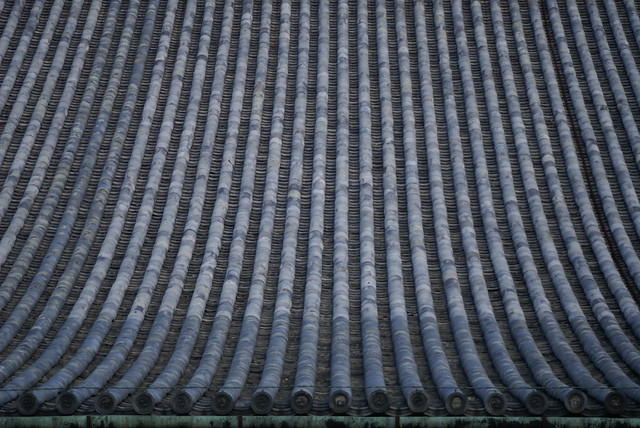
I’ve been doing a little research into Japanese roof design! It’s amazing what you can find on the internet, for example articles like this one explaining the history of the Japanese roof. Originally, the Japanese got the idea for roof tiles from the Koreans. However, these tiles consisted not only of flat tiles, but tubular tiles too and were fairly expensive. They were placed mainly on top of important buildings and shrines etc. This later devolved into the wave shaped tiles which are a common site in Japan, being much cheaper but almost as nice to look at. I’m not sure what the practicalities are of having waved tiles rather than flat ones, but if I was given the opportunity to have a roof that nearly resembled that of a Japanese temple I guess I wouldn’t pass it up. The image below is of a more ornate example, although there are obviously those that are more simple and others that are much more complex.

For my Ryokan roof, I originally fancied the original roof (as demonstrated at the top of this post!) But not only is it unlikely that a B&B would have such an ornate roof, it doesn’t seem to come out well in 2D form. Despite my gradient-effect efforts, the tile simply appeared to be flat.

The most left red tile is my attempt at the tube tile, abandoned fairly on for the wave tile which just works brilliantly. You can imagine the tile sloping at a 45 degree angle, even from a straight on perspective like this one. Being tiles, they repeat effortlessly. All I had to ensure was that they aligned evenly.
The colour of the roof has changed from blue to pinky-red, this is due to the out-doors colours scheme I’m currently conjuring. For the first level of the game at least, I want to use a lot of pinks and reds- similar colours to the Sakura blossom object. This is my way of saying “you’re in Sakura country now, Player1!” Plus, I want the outdoor world of Hanami to accurately represent a Japanese spring time.

After applying the new red tiles to the roof, I re-worked the wooden frame of the building using a new set of flexible tiles. Wood is a traditional building material which can still be seen today, especially in Kyoto which used to be the capital of Japan. They tend not to exist these days in many urban and even in rural areas, however I’ve chosen to create a tileset for wooden houses because it is a symbol of something that is traditionally Japanese.

I haven’t tried to accurately represent the layout of wood in a wooden Japanese house with my tiles, but give an impression of a wooden structure which has been cross-sectioned for the inside view of the Ryokan. To give you an idea of the scale of the building, I’ve placed Hana in the middle of this newly constructed space:

Kyoto Machiya.com is a great resource for images of traditional Machiya (Japanese wooden house), specifically Kyomachia which are Machiya located in Kyoto! The site’s galleries include photos of inside and outside various famous Machiya, which will be useful for the next step of the Ryokan construction, which will be to build its walls and inside!

Japanese Accommodation


Apart from perhaps a short opening sequence consisting of images or a short animations, Hanami begins in a small country bed & breakfast style building in a small village somewhere in Japan. These types of accommodation are called Ryokan. They are usually situated in more rural areas rather than large cities, and provide a cheap place to stay for travellers. Cons of cheap accommodation mean that rooms and facilities must be shared with other guests, but at the same time this opens up opportunities to meet people and share a truly Japanese living experience. Personally I prefer “private”, but beggars can’t be choosers!

I refer to a stay at a Ryokan as a “truly Japanese living experience” because one common characteristic of the Ryokan is its traditional Japanese features. The owners of this sort of establishment encourage guests to turn Japanese during their stay, by sleeping on futons, sitting at low tables, and usually eating the provided Japanese meals.

A traditional style Japanese breakfast:

Features of a traditional Style Japanese room or Washitsu:


Tatami Floors
These a woven floor coverings, aligned as a series of mats.


Shoji Sliding Doors
These structures, made from wood and paper, act as room dividers but slide to become doors.


Tokonoma
This is a small alcoved area where hanging scrolls and decorative items are placed. This areas is not entered, but enjoyed.


Zabuton
Flat cushions (sometimes with a back-rest) placed on the floor around a low Japanese table.

For my Ryokan, I’ve taken most of these elements and aspects from other traveller’s hostels. Cheap hostels are similar to Ryokan, but not as traditional. To make better use of space for example, hostels will often house guests in shared rooms with bunk-beds. In the most extreme circumstances, guests stay in their own tiny capsule, consisting of a bed, shelf and TV! These are much more common in urban areas.

In terms of 2D tile creation, bunk-beds make a lot more sense that low, flat futons! So I’ve built my Ryokan on three floors. The hotel has a Western-style bunkbed room at the top, and gets progressively more Japanese as it goes down. Bear in mind that this is a test mock-up, I can hardly even call this finished! I’m still trying to work out some of the tile issues.


If you click on the image above, you can start to get a feel for the real scale of the game. At the moment, I’m thinking of up-scaling the game to 300% during play, although this is something I haven’t decided for sure yet.

Roof Tiles

One thing I haven’t quite worked out yet is how to cross-section a Japanese roof to create a 2D tile. The blue around the edges of the image are supposed to be blue roof tiles, but these aren’t quite finished yet. The wooden part underneath is representative of traditional ceiling beams, although I’m not sure how well this comes across in cross-section form either…

You can probably tell from the image that I’ve also had a few problems rotating my roof tiles, and there are plenty of inconsistencies to be found…

Guest Room

I’ve resized the bunk-beds from before so that they are more human sized, and cleverly pushed two together so that the obscene length doesn’t seem out of place! The bunk-bed tiles probably won’t need too much attention from now on, as there isn’t much to them and not much that can be changed. The window is a set of four tiles, which can be lengthened width-ways if I should need to! I’m fairly happy with the result of the window, I just know I should be cautious with frame outside the four-square area. The little draws are just one tile, and can be stacked or duplicated length ways easily. I’ve tried to keep all wood-colours consistent.

Wall Ties
These were looking very plain and boring, so I tried to add a certain amount of texture to them. I’m worried that now they border on the messy side, and will hopefully be tweaking these.

Sofa Area

This is part of the shared “communal floor”. The proportions seem like less of a problem on this floor, I’ve created a sofa from two tiles and halved the draws to create an end-table which is only half a tile high (the red strip on top represents the place the Maneki Neko likes to sit!). The chairs to the right of this screenshot are the same height as the sofa, although I’ve made sure that this emphasises the lowness of the table.

You can also see from this screenshot where I’ve tried to add shading under the roof tiles using “floating” semi-transparent tiles which adjust the tiles beneath them.

Ladders
With this sort of perspective, drawing staircases are a bit of an issue. I’m not sure Ryokan even have first or second floors, but I think it would be understandable in this kind of situation to have to climb a ladder! In my opinion, this doesn’t look out of place, but if I make a successful staircase then I will replace the ladder.

Downstairs

Here you can see all the traditional aspects of a Japanese Washitsu that I’ve just mentioned, although I still have some not-quite-aligning elements which may need re-scaling in order to fit better into the grid. I’m also not sure I’m happy with the wood-strip detail on the wall. I think it detracts from the room’s important details.

Tatami Floor
The ground floor tiles are supposed to look like Tatami, although I’m not sure they really do. It somehow doesn’t look much like a floor at all, probably because it is too square and therefore quite similar to the sliding doors above it. In fact, the sliding doors and the floor could do with a better indication of depth, to separate themselves from each other.

At the moment, the image covers a few layers in a Photoshop document. What I need to concentrate on, is creating a tile set rather than a flat image that looks like it has been made from tiles!

Three Games I Played Yesterday…


One of the great advantages of using Game Maker is having access to a whole community of amateur game developers, through discussion forums and Yoyo Games’ Sandbox site, where developers can publish their games for free. Yesterday, I had a browse through the adventure and platform games available on the site, and picked out a few to diagnose.

Nea’s Adventure

This game was created as a Christmas present! It’s a really short 2D Platformer with no serious side whatsoever. There are a lot of graphical references, such as the background tiles which are very similar to the Kirby’s Adventure tiles… and some original aspects, such as the health bar made of tessellated triangles which disappear when the character is hit by an enemy. The game simply plays from left to right in most cases, although there are a few hidden areas and a final “boss fight” to break up the monotony.

Good Points
Fast-paced and simple gameplay
Infinite Lives (character returns to start of the level on “death”)
Character becomes a fish underwater!

Bad Points
Moving underwater seems unnatural
Combo jump-attack is sometimes unwanted
Too short!

You can download Neas Adventure here.

The Adventure of Young Glubber

I decided to play this game base on its aesthetics (it had me at Gameboy Green), but I was happy to discover that its objectives are fairly similar to the game I’m in the process of creating. The “thing” in TAoYG must collect torches in order to unlock doors, some torches harder to attain than others. The character has a certain amount of hit points, which are deducted when the character is hit by an environment hazard.

Good Points
Torches animate when the character is near
No enemy NPCs
Skill and brains required

Bad Points
Physics feel a little unnatural at times, especially when jumping
Spike objects can damage the character from the smooth side

You can download the Adventure of Young Glubber here.

98-X

I picked this game to play as the preview images looked to be high quality. It would be incredibly harsh to call this a bas game, as it excells far beyond a lot that you find on the Yoyo site! But I was disappointed, mainly by graphical elements such as the GUI, dialogue boxes and 4:3 aspect ratio. Normal for these retro sort of game 4:3 wouldn’t be an issue, but I feel the quality of the larger sprites in this game should have been reflected in the rest of the game’s specs. As I say, I don’t want to sound harsh- at least this game uses original assets and sprites.

Good Points
Easy to control weapon system
Original Characters

Bad Points
Text boxes cover a large portion of the screen
Movement, especially triple wall-jumping seems VERY unnatural and difficult to handle
Graphically very boring at times

You can download 98-X here.

My objectives for this week are to “design and prototype.” I want to start getting level design down, sort out game physics and build levels, even if for now these levels consist of the Grandma Engine’s default blocks! These games have given me little bits to think about, like the sort of physics that feel natural to handle and nice graphical touches like collectable objects that react when you get near them. This week I am going to spend a LOT of time looking through images of Japanese country landscapes and specifically building design in order to create a good set of tiles.

I discovered this video from the 2010 8GB tour, featuring the Tokyo Blip Festival, which is an annual chiptune music festival. The video shows a journey through various parts of Japan, although what I love about it is the contrast between the bright lights of the busy cities at night and the calm atmosphere of a visit to the Shinto Shrine. This is the side of Japan which will be most frequently reflected in Hanami.